HD vs SD video on Facebook: what the labels mean and which one to save
HD and SD are shorthand for resolution, but file size depends on bitrate too. Here is the arithmetic for both, what the labels mean for vertical video, and when the smaller file is the better choice.
When the imgstools Facebook tool resolves a public video, it usually offers two versions: HD and SD. Those are the two playback versions Facebook itself exposes for that post. Picking one is easy if you know what the labels stand for, and what they don't tell you.
What the labels mean
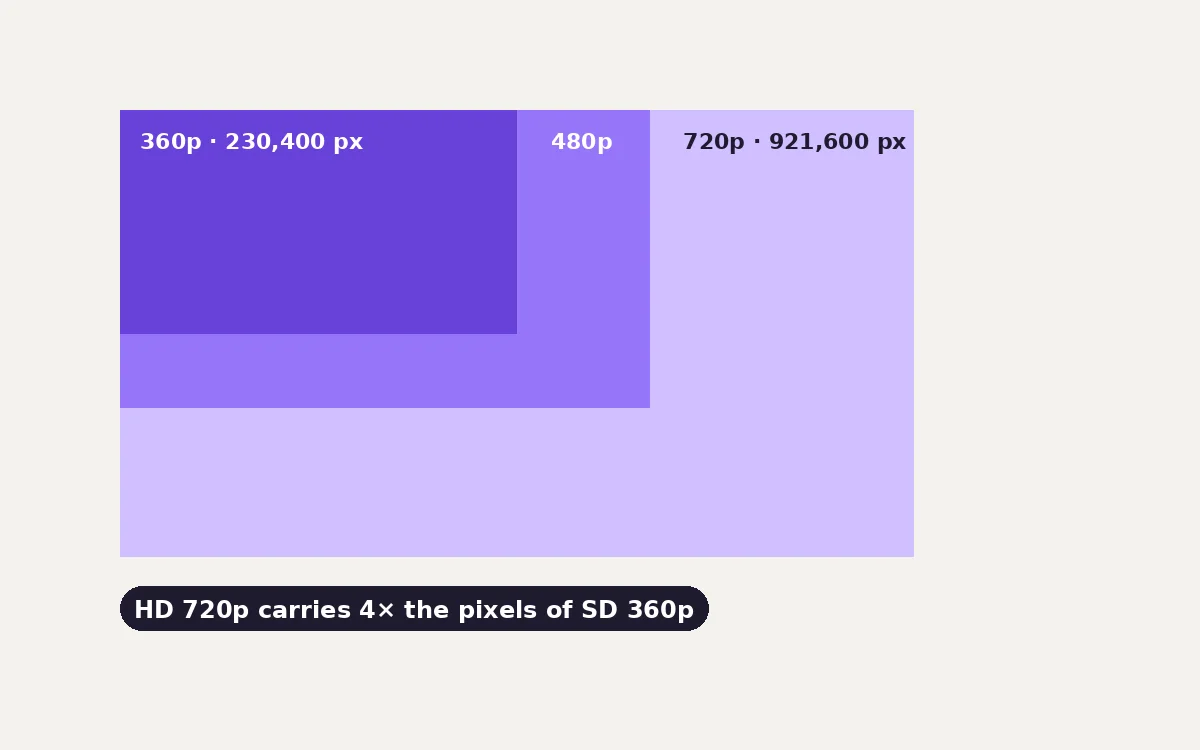
"HD" (high definition) and "SD" (standard definition) are names for resolution bands, not exact sizes:
| Name | Typical frame (landscape) | Pixels per frame | Compared with 360p |
|---|---|---|---|
| SD 360p | 640 × 360 | 230,400 | 1× |
| SD 480p | 854 × 480 | 409,920 | 1.8× |
| HD 720p | 1280 × 720 | 921,600 | 4× |
| Full HD 1080p | 1920 × 1080 | 2,073,600 | 9× |
The "p" number is the short side of the frame. For vertical video, the kind you see in reels and stories, the frame is turned on its side: a "720p" vertical video is 720 pixels wide and 1280 tall. Same pixel count, different shape.
Facebook decides what resolutions to keep for each upload. The SD version is a smaller copy made for slow connections, and the HD version is only as good as the original upload. If someone uploaded a 480p clip, the "HD" version cannot contain more detail than that.
File size depends on bitrate, not just resolution
Resolution says how many pixels each frame has. Bitrate says how many bits per second the video spends describing them, and it is what sets the file size:
file size (MB) ≈ bitrate (megabits per second) × duration (seconds) ÷ 8
The ÷ 8 converts bits to bytes. For one minute of video at example bitrates:
| Bitrate (video + audio) | 1 minute | 5 minutes | 20 minutes |
|---|---|---|---|
| 0.5 Mbps | 3.8 MB | 19 MB | 75 MB |
| 1 Mbps | 7.5 MB | 38 MB | 150 MB |
| 2 Mbps | 15 MB | 75 MB | 300 MB |
| 4 Mbps | 30 MB | 150 MB | 600 MB |
| 8 Mbps | 60 MB | 300 MB | 1.2 GB |
These are example rates for planning, not Facebook's settings, which vary by video. To work out the rate of a file you have downloaded, divide its size by its length: a 45 MB file that runs 3 minutes is about 45 × 8 ÷ 180 = 2 Mbps.
Two consequences:
- HD is not "4× the size". A higher resolution usually gets a higher bitrate, but the ratio depends on the content and the encoder. Static scenes, slides and talking heads compress far better than sport, confetti or handheld footage.
- A low-bitrate HD video can look worse than a high-bitrate SD one. If the HD version looks blocky in fast motion, the encoder ran out of bits, not pixels.
Which version should you save?
Save HD when:
- You will watch it on a laptop, TV or large monitor.
- The video contains text you need to read: slides, captions burned into the picture, screen recordings, scores.
- You plan to edit, crop or zoom. Cropping a 1280-wide video to a vertical 9:16 slice leaves about 405 pixels of width, while the same crop from a 640-wide video leaves only about 200.
- It is an archive of your own content, where you want the best copy available.
Save SD when:
- You only need a quick reference, a reminder or something to show on a phone.
- You are sending it over a messaging app that will recompress it anyway.
- Storage or data is limited. Ten SD clips can fit in the space of three or four HD ones.
When in doubt, save HD. You can always make a smaller copy later, but you can't add detail to the SD one.
Both versions include sound
The HD and SD options are full videos with audio. If a post exposes photos instead of a video, the tool lists the photos separately. For a public post with several photos, each image the post makes publicly available is listed.
Why a video might not resolve at all
The tool can only see what Facebook shows to a visitor who is not logged in. A video won't resolve if:
- the post is private, friends-only or in a private group;
- the video was removed, or the account was deactivated;
- the post is age-restricted or limited to certain countries;
- it is a live stream that hasn't finished processing.
That is intentional: imgstools doesn't log in, bypass privacy settings, or access anything the public can't. To keep copies of videos you posted yourself, including private ones, use Facebook's own export (Accounts Center → Your information and permissions → Download your information).
Before you reuse a Facebook video
A video being public on Facebook doesn't make it free to re-upload elsewhere. The person who filmed it usually holds the copyright. For your own posts, save freely. For someone else's, link to it or use Facebook's embed feature, or ask permission. Our guide to saving social media responsibly explains how.
Method
Pixel counts are exact frame dimensions. File sizes in the bitrate table use the formula above with decimal units (1 MB = 1,000,000 bytes), rounded to two significant figures. They are arithmetic, not measurements of Facebook's encoder. Behaviour of the imgstools Facebook tool is described from its source: it lists the HD and SD playable sources and the photos that a public post exposes.
Keep exploring
More from imgstools

Saving social media videos and photos: your own archive, permission and copyright basics
Read note
What JPEG and WebP Quality Setting Should You Use? We Tested 8 Photos
Read note