TikTok videos, sounds, photo slideshows and covers: which file is which
A public TikTok post can expose several kinds of file: two video versions, the original sound, slideshow photos and a cover image. Here is what each one is, how good it can be, and what you may do with it.
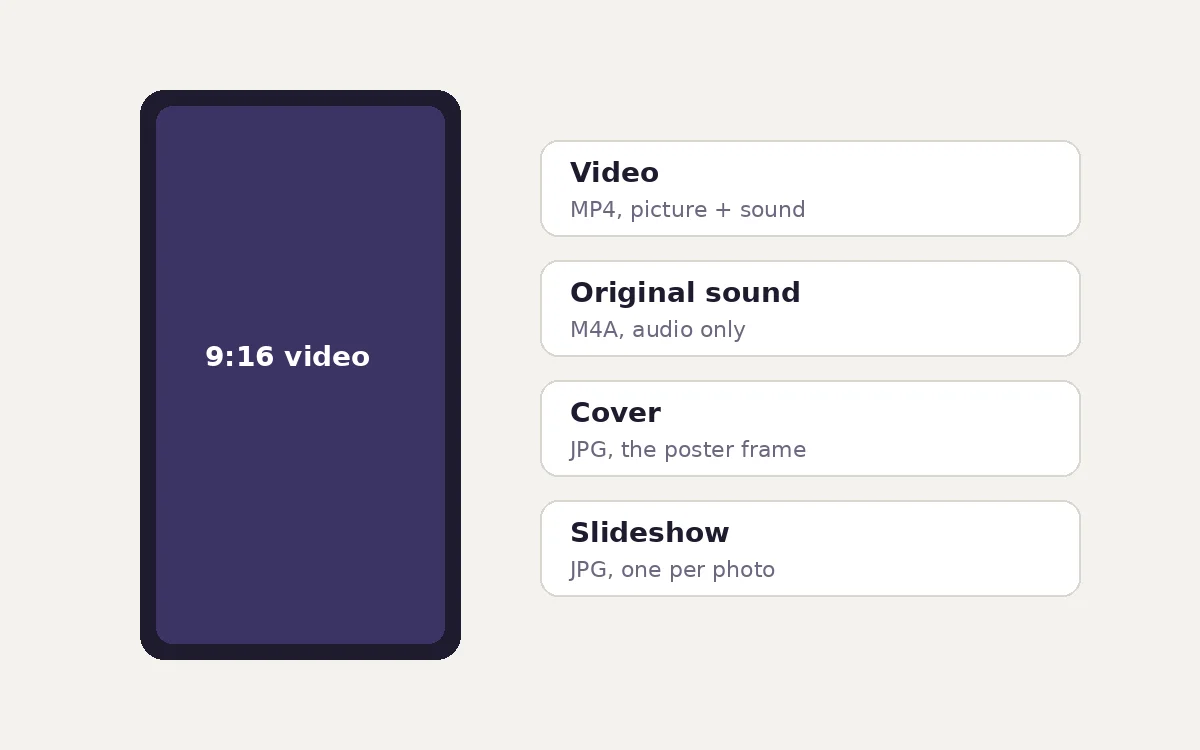
Paste a public TikTok link into the imgstools TikTok tool and you may see several options, not just "download video". Each is a different file that TikTok publishes for the post. Here is what they are, so you can pick the right one, and an honest note on what you're allowed to do with each.
The files a TikTok post can expose
| Option | Format | What it is | When it appears |
|---|---|---|---|
| HD · MP4 | Video with sound | The stream TikTok plays on its website | Video posts |
| Original · MP4 | Video with sound | The version TikTok prepares for its own download feature | When TikTok exposes it |
| Audio only · M4A | Sound only | The post's "original sound" track | When the post has a sound |
| 1. Photo · JPG, 2. Photo · JPG… | Image | Each picture in a photo slideshow, in order | Photo-mode posts |
| Cover image · JPG | Image | The poster frame shown before playback | Video posts |
HD and Original: two versions of the same video
TikTok keeps more than one encoding of each video. The tool lists the two it can find publicly:
- HD · MP4 is the playback stream: what you watch in a browser. It is usually the cleanest picture.
- Original · MP4 is the file behind TikTok's own "save video" option. Depending on the post and the creator's settings, it can differ in quality, and it may carry TikTok's on-screen watermark with the creator's username.
If you're keeping a copy of your own video, take both and keep whichever looks better. If you're saving someone else's video with their permission, a version that keeps the creator's watermark is a sensible courtesy.
Most TikTok videos are vertical, 9:16. They are commonly 1080 × 1920 or 720 × 1280 pixels, depending on what the creator uploaded.
Audio only: the "original sound"
Every TikTok video has a sound. The M4A option is that track on its own: AAC audio in an MPEG-4 container, which plays in every modern phone, browser and media player.
Be careful with what "original sound" means. On TikTok it is the name of the sound page, not a guarantee that the poster created the audio. Many original sounds include commercial music, film clips or someone else's voice. Uses that are usually fine:
- keeping the audio of your own video, for example a voice-over you recorded;
- listening offline, or transcribing a spoken explanation for your own notes.
Uses that usually need permission are putting the audio into your own videos outside TikTok, podcasts, adverts or anything published. If the sound is a commercial song, the rights belong to the label and songwriters, not to the TikTok poster.
Photo slideshows
TikTok's photo mode posts a series of still images, usually with music. For these posts the tool lists each photo as a numbered JPG ("1. Photo · JPG", "2. Photo · JPG" and so on), in slideshow order. The tool does not list a separate cover image for photo posts. You get the stills exactly as TikTok serves them. The music is a separate audio track, so the "Audio only" option gives you the sound.
Slideshow photos are often vertical or square. To reuse one elsewhere, see the crop section below.
Cover images
The cover is the frame or custom image a creator picked to represent the video in grids and search results. It's useful as a reference, or, for your own videos, as a thumbnail on a blog or portfolio. It is a JPG at whatever size TikTok serves, usually close to the video's own dimensions.
Reusing vertical media in other shapes
TikTok media is tall. Most other places want something wider:
| From 9:16 to… | Share of the frame kept |
|---|---|
| 4:5 portrait feed post | 70% |
| 1:1 square | 56% |
| 16:9 widescreen thumbnail | 32% |
Turning a vertical cover into a 16:9 thumbnail keeps less than a third of it, so a face or a caption near the top or bottom will almost certainly be cut. Either choose the frame carefully in the crop tool, or place the vertical image on a wider background instead of cropping it. Our aspect ratio guide has the formula for exact crop sizes.
Why a link might not work
The tool sees only what TikTok shows to a logged-out visitor. These won't resolve:
- private accounts and friends-only posts;
- removed or banned videos;
- videos restricted in the region the request comes from;
- some posts where TikTok doesn't publicly expose a particular file, such as the audio or the "Original" version.
To back up your own TikTok account completely, use Settings and privacy → Account → Download your data in the app. Options and contents vary by region.
The short version on rights
- Your own videos, sounds and covers: save and reuse freely.
- Someone else's video: share the TikTok link or embed it. Re-uploading it needs the creator's permission, even with credit.
- A sound that contains music: the music rights are separate from the video and usually belong to the label. Don't publish it elsewhere.
- Duets, stitches and remixes are features inside TikTok. Downloading a clip to recreate them elsewhere is not the same thing.
Our guide to saving social media responsibly covers fair use, asking for permission and embedding in more detail.
Method
The file types and labels described here come from the imgstools TikTok tool's source. It reads a public post's video playback and download addresses, the music track's play URL, slideshow images, and the cover image. Crop percentages are exact geometry (the smaller aspect ratio divided by the larger). TikTok's own settings, file versions and export options can change.
Keep exploring
More from imgstools
Does Re-saving a JPEG Lower Its Quality? We Saved Photos 10 Times to Find Out
Read note
Straightening a tilted photo: how much each degree costs, and the exact crop to use
Read note