AI image labels and Content Credentials: what editing an AI-generated image does to them
Many AI image generators tag their output as AI-made, in metadata or a signed Content Credentials manifest. We tested what survives a simple crop or re-save: none of it did.
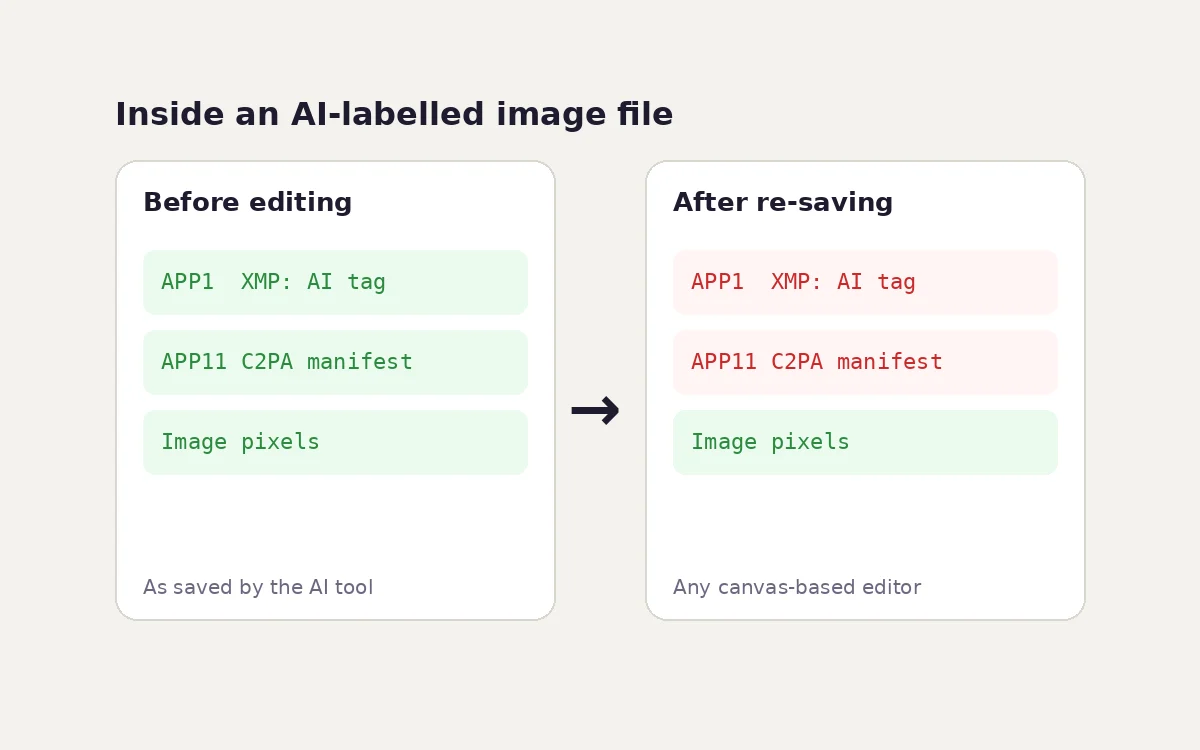
More and more AI-generated images carry a marker that says, in machine-readable form, "an AI made this". Social platforms read those markers to show labels such as "AI info" or "Made with AI", and new rules in the EU require AI providers to add them. But the markers live in the file's metadata, and metadata is fragile. We tested what happens to them when someone does something completely ordinary: crops, resizes or converts the image in a browser tool.
Three ways an image can say "AI-made"
- An IPTC tag in the metadata. The IPTC photo metadata standard has a field called Digital Source Type. The value trainedAlgorithmicMedia means "created by a trained AI model"; compositeWithTrainedAlgorithmicMedia means a real photo with AI-generated parts. The tag is stored as XMP, in a JPEG APP1 segment or a PNG text chunk. It is plain text: anyone can add, change or remove it.
- C2PA Content Credentials. The C2PA standard stores a signed manifest describing where the image came from and how it was made, including the same AI source type. The signature makes tampering detectable. In a JPEG the manifest lives in APP11 segments (a container format called JUMBF); in a PNG it lives in a chunk named caBX.
- An invisible watermark in the pixels. Some providers, such as Google with SynthID, change the pixels themselves in a way that people can't see but a detector can. This is not metadata, so it is designed to survive ordinary edits. Detection, though, is controlled by the provider.
Methods 1 and 2 are what most labelling systems read, and they are the ones that ordinary editing affects.
The test
We built two test images, one JPEG and one PNG, each carrying:
- an XMP packet with the IPTC Digital Source Type set to trainedAlgorithmicMedia;
- a C2PA-style JUMBF box labelled "c2pa", in an APP11 segment (JPEG) or a caBX chunk (PNG).
The manifest was a placeholder without a real signature. The test asks whether the container survives, not whether a signature verifies.
Then we ran each file through the path every imgstools image tool uses, and so do most browser-based editors: decode the image, draw it onto a canvas, and save a new file. We parsed each output's structure to see what was left.
Result: nothing survived
| File | IPTC AI tag | C2PA container | What the file contained |
|---|---|---|---|
| Test JPEG (input) | Present | Present (APP11) | APP0, APP1 (XMP), APP11 (C2PA) |
| Re-saved as JPEG | Gone | Gone | APP0, APP2 (colour profile) |
| Re-saved as WebP | Gone | Gone | VP8X, ICCP (colour profile), VP8 |
| Re-saved as PNG | Gone | Gone | IHDR, IDAT, IEND |
| Test PNG (input) | Present | Present (caBX) | IHDR, iTXt (XMP), caBX (C2PA), IDAT, IEND |
| Re-saved as JPEG, WebP or PNG | Gone | Gone | Same as above |
The result follows from how a canvas works. It holds only pixels. Whatever was written around the pixels, including EXIF, XMP, IPTC and C2PA, is not part of the picture, so it is not in the new file. This is the same reason re-saving removes GPS location, which our location data guide relies on.
An invisible pixel watermark is a different matter. Re-saving keeps the pixels, so a watermark designed to survive compression and resizing would very likely still be detectable. We couldn't test that without the provider's detector.
What this means in practice
Labels disappear easily, often without anyone meaning to
A designer who crops an AI-generated illustration for a blog post, or resizes it for a product page, has usually removed its AI label without noticing. The same can happen on upload: one widely reported test uploaded an AI video carrying Content Credentials to eight major platforms, and seven of them stripped the credentials. Some platforms read the data to apply their own label first.
So:
- A missing label doesn't mean an image is real. Absence of credentials proves nothing.
- A present label is a claim, not a guarantee. IPTC tags are unsigned text. A C2PA manifest is signed, but the signature tells you who made the claim, not whether the content is true.
If you publish AI images, disclosure is your job, not the file's
Most platform rules ask for disclosure of realistic AI-generated or AI-altered content, whatever the file's metadata says. Some, such as YouTube, rely on the creator's own disclosure setting. Since a simple edit can remove machine-readable labels:
- Use the platform's own AI disclosure option when you post realistic AI content.
- Add a visible caption or credit ("Image generated with AI" or "AI-assisted edit") where your audience will see it.
- Keep the original file from the AI tool, with its credentials, as your record of where the image came from.
- Edit from that original each time, rather than a copy of a copy.
The rules are tightening
Under Article 50 of the EU AI Act, applying from 2 August 2026, providers of generative AI systems must mark their output in a machine-readable way. The Act doesn't prescribe the technology; metadata, Content Credentials and watermarks are all candidates. Separately, people who publish deepfakes (realistic AI-generated or AI-manipulated images, audio or video of real people, places or events) must disclose that they are artificial. Marketplaces have their own rules; Google Merchant Center, for example, asks merchants to keep the IPTC AI tag on AI-generated product images.
This guide is general information, not legal advice. If your business publishes AI imagery in the EU, check the current guidance and transition dates.
What imgstools does and doesn't do
- The imgstools editors re-encode images in your browser, so their output contains no EXIF, XMP, IPTC or C2PA metadata. That protects your privacy when you share personal photos. It also means they don't preserve AI labels.
- imgstools doesn't add or edit Content Credentials or IPTC fields. If you need to keep provenance through an edit, use software that supports C2PA, which can record your edit as a new signed step.
- Don't use any tool to strip labels from AI content in order to pass it off as real. Beyond platform rules, that can be deceptive or unlawful depending on where and how the image is used.
Sources and further reading
- IPTC: Digital Source Type vocabulary, including trainedAlgorithmicMedia.
- C2PA: Content Credentials specifications, including how manifests are embedded in JPEG and PNG.
- European Commission: AI Act overview, including the transparency obligations.
Method
Test files were built with Pillow from a CC0 photo by Rachel Michetti, with a hand-built XMP packet and a JUMBF superbox (description box with the C2PA content type and the label "c2pa", plus a placeholder content box). They were injected as an APP1 and an APP11 segment in the JPEG, and as an iTXt and a caBX chunk in the PNG. Each file was decoded by Chromium 141, drawn to a 2D canvas and exported with toBlob as JPEG (0.92), WebP (0.80) and PNG. Outputs were checked by parsing their JPEG segments, PNG chunks and WebP RIFF chunks, and by searching for the XMP, IPTC and C2PA markers.
Keep exploring