How AI chatbots see your images: size limits, token cost, and what to do before uploading
ChatGPT, Claude and Gemini all shrink large images before reading them. Here is how much, what that does to small text, and how cropping, resizing and stripping metadata first gets better answers.
When you attach a photo or screenshot to an AI chatbot, the model doesn't read your file at full size. Each provider scales large images down to a fixed budget first, then turns the pixels into tokens, the units the model reads and you pay for. Knowing that budget explains a lot. It's why a model misreads small text in a big screenshot, why some uploads feel slow for no benefit, and why cropping first often gets a better answer.
Provider limits change often. The figures here come from each provider's official documentation as checked in November 2026; links are at the end.
The short version
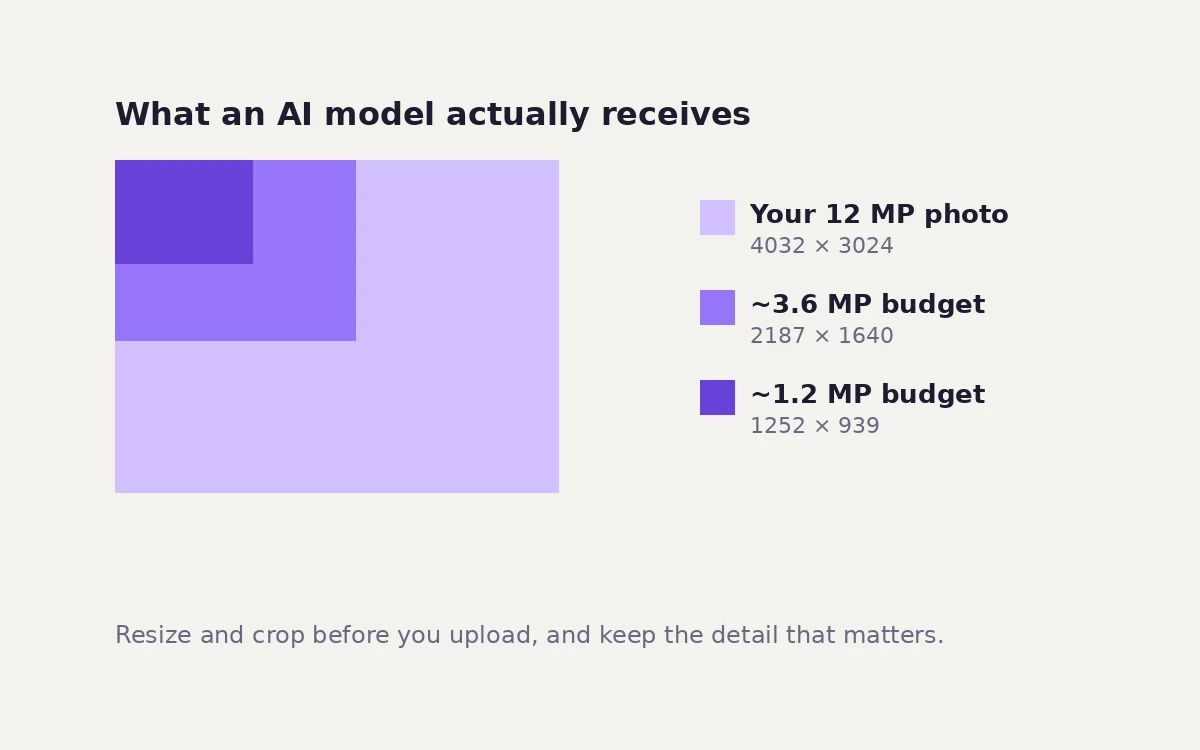
- Large images are shrunk before the model sees them. A 12-megapixel phone photo is reduced to roughly 1 to 4 megapixels, depending on the model.
- Small details suffer first. Fine print, small UI text and distant faces lose the most.
- Crop to what matters before you upload. A crop of the relevant area reaches the model at full detail instead of being shrunk with everything else.
- Strip metadata from personal photos. Uploading sends the whole file, location data included, to the provider.
How each provider sizes images
Claude (Anthropic)
Anthropic documents a simple rule: an image costs about width × height ÷ 750 tokens. Each model has a cap, and larger images are scaled down, keeping their proportions, until they fit:
| Claude models | Token cap per image | Longest side |
|---|---|---|
| Opus 4.7 and later, Fable 5, Mythos 5 | 4,784 tokens (about 3.6 megapixels) | 2,576 px |
| Other current models | 1,568 tokens (about 1.2 megapixels) | 1,568 px |
Applying those rules to common images gives the size the model actually works with:
| Your image | Original size | Older budget (~1.2 MP) | Newer budget (~3.6 MP) |
|---|---|---|---|
| 12 MP phone photo | 4032 × 3024 | about 1252 × 939 | about 2187 × 1640 |
| Laptop screenshot on a 2× display | 2880 × 1800 | about 1371 × 857 | about 2395 × 1497 |
| iPhone screenshot | 1179 × 2556 | about 723 × 1568 | 1179 × 2556 (fits) |
| Full HD screenshot | 1920 × 1080 | about 1445 × 813 | 1920 × 1080 (fits) |
| A4 page scanned at 300 dpi | 2480 × 3508 | about 911 × 1289 | about 1592 × 2252 |
Calculated from the published formula. The provider's exact resizing may differ by a few pixels.
Anthropic also lists a maximum of 8000 × 8000 pixels per image, which drops to 2000 × 2000 when a single API request contains more than 20 images.
ChatGPT and the OpenAI API
OpenAI's current documentation describes a patch-based method. The image is first resized to the pixel limit for the chosen detail level (low, high, original or auto, depending on the model). It is then divided into 32 × 32 pixel patches, and the patch count is multiplied by a model-specific factor:
patches = ceil(width ÷ 32) × ceil(height ÷ 32)
A 1024 × 1024 image is 1,024 patches; a 1920 × 1080 image is 2,040. Pixel limits and multipliers differ between models, and OpenAI notes that "low" detail does not always cost fewer tokens than "high" on newer models. Check the table for the model you use.
Gemini (Google)
For Gemini 3 models, Google uses a media resolution setting rather than a formula. Each image is processed at a fixed token budget: 280 tokens (low), 560 (medium), 1,120 (high, the default) or 2,240 (ultra high). A higher setting keeps more detail at a higher cost. Earlier Gemini models count image tokens differently.
What downscaling does to small text
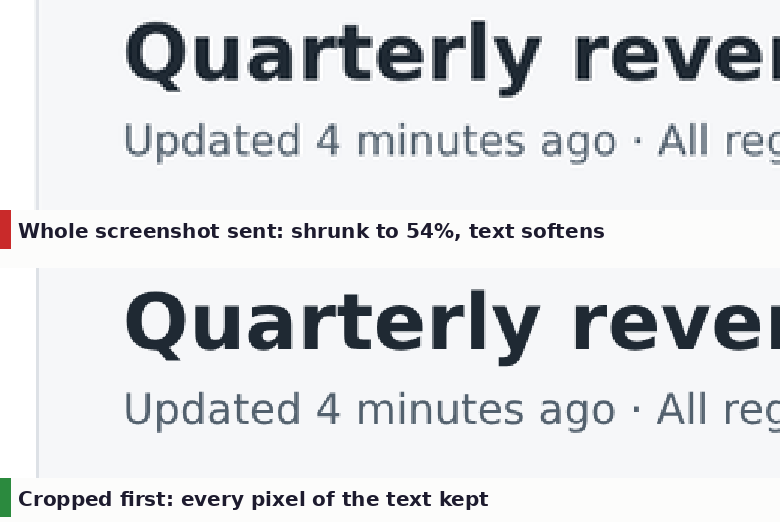
We rendered a 2560 × 1600 dashboard screenshot, the kind a laptop with a 2× display produces, and shrank it to the 1.2-megapixel budget used by many Claude models. Everything ended up at 54% of its original size. Headlines survive easily. The small grey caption is still readable here, but softer. Denser content, such as spreadsheet cells, fine print or a whole document page, can drop below what the model can reliably read.
The fix is to crop first. A crop of just the part you're asking about usually fits within the budget as it is, so the model gets every pixel of it.
A better upload, step by step
- Decide what the question is about. If you're asking about one error message, one chart or one paragraph, the rest of the screen is noise.
- Crop to that area with the crop tool. For a document, crop to the paragraph or table you're asking about; for a photo, to the object.
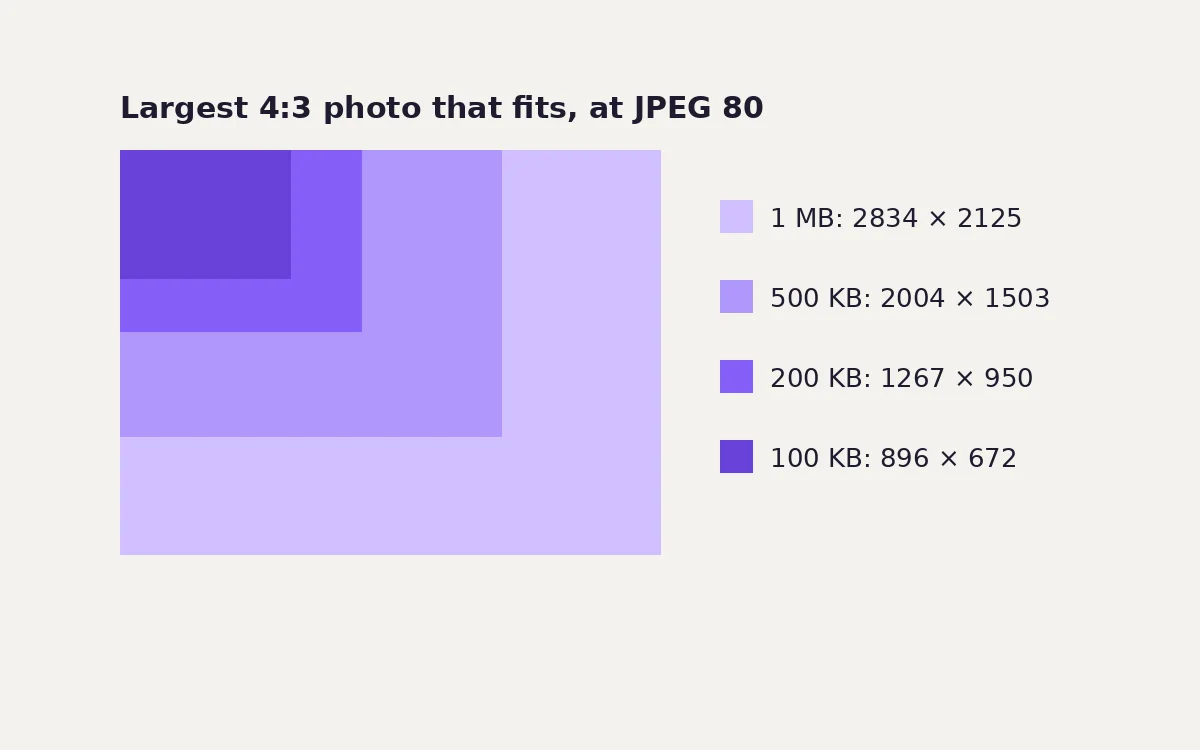
- Resize big photos to the budget with the resize tool. There's no benefit in uploading 12 megapixels when the model will use 1 to 4. A long side of about 1,500 px suits the smaller budgets, and about 2,500 px suits the larger ones.
- Pick a sensible format. Screenshots and text: PNG, or WebP at 90 or above. Photos: JPEG or WebP at about 85, using the compressor. JPEG, PNG and WebP are accepted by all three major APIs. Convert HEIC or AVIF photos first with the converter.
- Several images beat one giant one. If you need a whole long page read, split it into a few crops rather than one tall screenshot. Each crop gets its own budget.
Before you upload a personal photo
An AI chat is not a local tool. The file goes to the provider's servers, and depending on your settings it may be kept, reviewed or used to improve their models. Two habits are worth building:
- Strip location and camera data first. Phone photos often carry GPS coordinates. Re-saving the photo in a browser tool removes them; our location data guide has the tested method.
- Crop out what the AI doesn't need. Faces of other people, house numbers, documents on the desk, screens in the background.
The imgstools image tools process files on your own device, so preparing a photo this way doesn't send it anywhere. Only the final, cropped file reaches the AI provider, and only when you upload it.
Common questions
Will a bigger image always get a better answer? No. Beyond the budget, extra pixels are thrown away before the model sees them. What helps is spending the budget on the right part of the image, which is what cropping does.
Why does the model misread numbers in my screenshot? Usually because the screenshot was shrunk to fit the budget and the numbers became a few pixels tall. Crop to the numbers and upload again.
Do chatbots remove location data from photos I upload? Providers don't consistently say. Assume the full file, metadata included, is received, and remove anything you wouldn't want stored.
Sources
- Anthropic: Vision documentation (token formula, per-model caps, dimension limits).
- OpenAI: Images and vision guide and image cost calculator (detail levels, 32-pixel patches).
- Google: Gemini media resolution (per-image token levels for Gemini 3).
Method
Budget sizes were calculated from Anthropic's published token formula and caps, keeping each image's aspect ratio. The downscaling figure uses a 2560 × 1600 dashboard screenshot rendered in Chromium 141 at a device pixel ratio of 2, reduced with Lanczos resampling to the largest size within 1,568 tokens (about 1.18 megapixels). Providers may use different resampling. Patch counts apply OpenAI's documented formula before any model multiplier.
Keep exploring